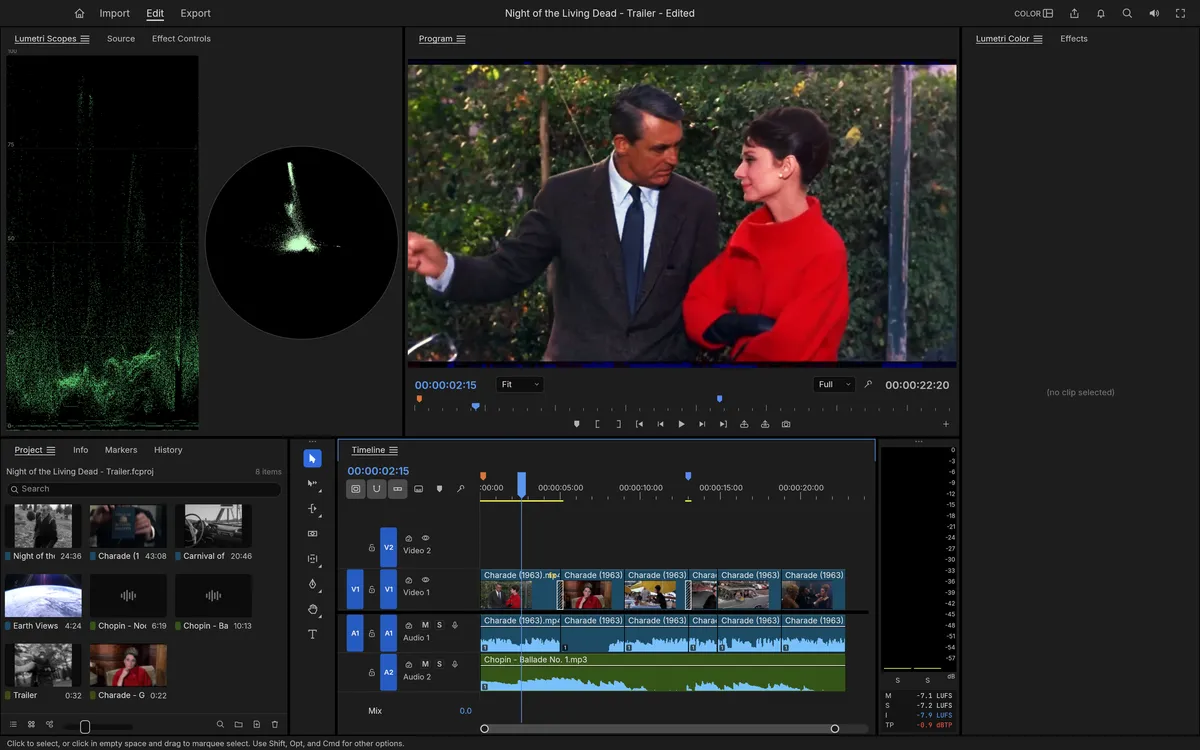
FilmCraft is a free, open-source non-linear video editor for people who know Premiere Pro. It keeps Premiere's panels, workspaces, tools and shortcuts, but underneath it is new from the bitstream up: the ArtCraft team wrote it in Rust, including its own H.264, HEVC, ProRes and AAC codecs. It runs on Windows, macOS, Linux, FreeBSD and in the browser — try FilmCraft online.
What FilmCraft can do
- Edit: Source and Program monitors, bins, three-point editing, ripple, roll, slip, slide, rate stretch and razor, a Trim Monitor, markers, nesting and unlimited undo.
- Colour: a Lumetri-style panel — Basic Correction, looks, curves, colour wheels, HSL secondaries and vignette — graded in 32-bit linear light with waveform and vectorscope.
- Effects: Premiere's full Video Effects bin (93 effects in 16 folders), around 30 transitions, motion, opacity and 26 blend modes, with Bezier keyframes and value and velocity graphs.
- Audio: EBU R128 loudness meters, EQ, dynamics, DeNoise and reverb, and a track mixer with automation.
- Titles and captions: a real text engine, shapes, and SRT/WebVTT/SCC captions.
- Interchange: FCP7 XML, FCPXML, AAF and OpenTimelineIO to move timelines between editors.
Where it stands
FilmCraft's authors measure about 86% of Premiere Pro's features but put it
at roughly 56% ready for real work. The biggest gaps: speed on big footage,
no opening of Premiere .prproj files (use XML, AAF or OTIO instead), no
plug-ins, H.264 as the only software delivery codec, and less testing on
Windows and Linux than on macOS.
FilmCraft vs Premiere Pro
Premiere is mature and fast with every plug-in you need; FilmCraft is free, open source, runs in a browser and gives you Premiere's layout without a subscription. For a hobby edit or to learn editing it is already useful; for paid work, test it alongside your current editor.
Try it
FilmCraft Online opens with a demo project, so you can scrub, trim and grade within seconds. For long projects, install the desktop app from the same page.
Questions people ask
Can I use Premiere Pro shortcuts in FilmCraft?
Yes. Its Keyboard Shortcuts editor has presets for FilmCraft, Premiere Pro, Final Cut Pro and Avid layouts, with conflict warnings.
Which formats can FilmCraft export?
H.264 MP4 with AAC from its own encoders, Apple ProRes 422 HQ and Motion JPEG in QuickTime, MXF, PNG sequences, animated GIF and WAV.
Does FilmCraft support captions?
Yes: caption tracks in Subtitle, CEA-608, CEA-708 and Teletext formats, with SRT, WebVTT and SCC import and export.
Try FilmCraft right now
The full editor runs in your browser. No install, no account.